Desk Worker’s Survival Guide: Fixing Posture and Reducing Back Pain.
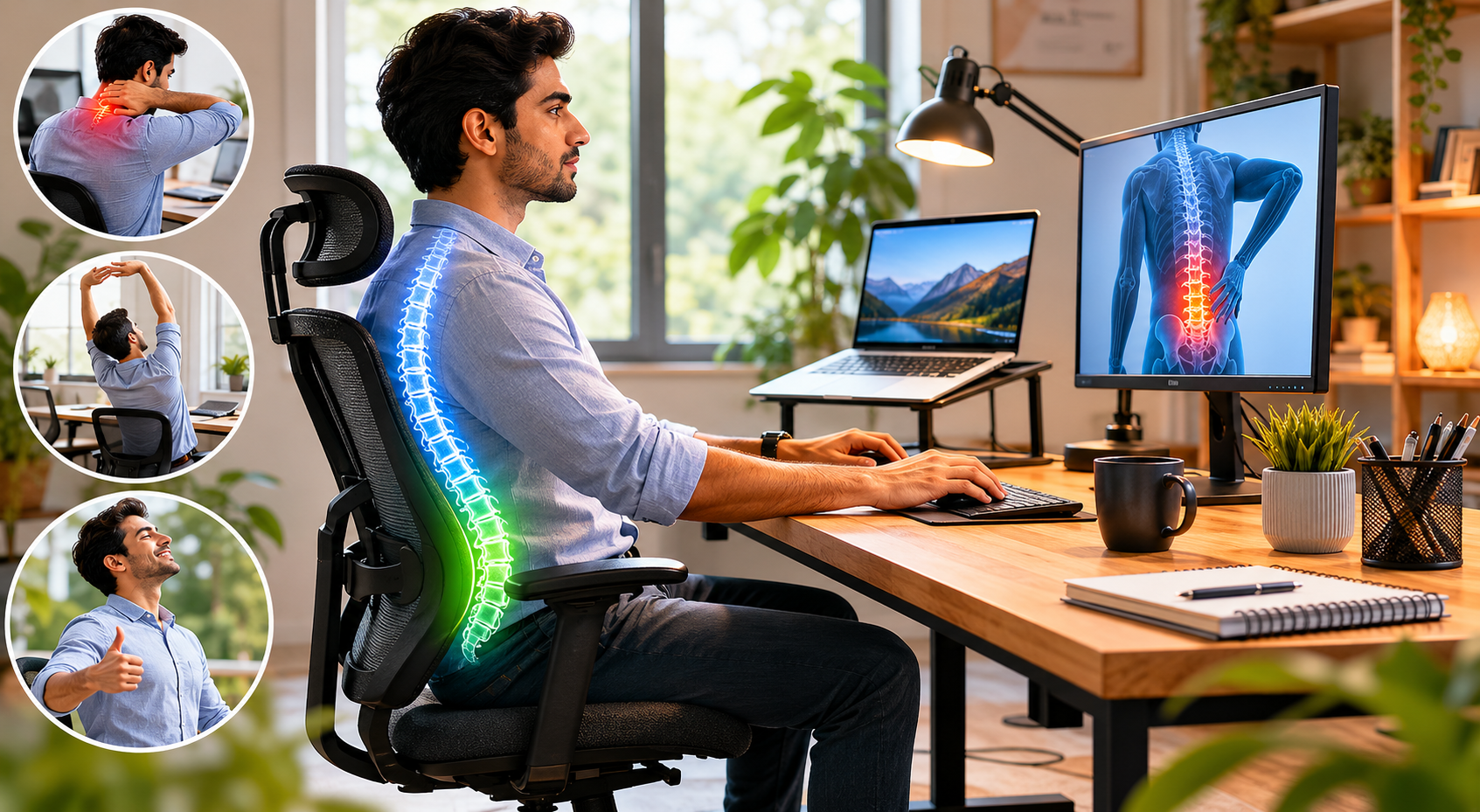
Desk Worker’s Survival Guide: How to Fix Poor Posture and Reduce Back Pain
In today’s digital workplace, millions of desk workers, office employees, remote professionals, and freelancers spend 6–10 hours or more each day sitting at a computer. While this may seem harmless, prolonged sitting and poor workstation habits can contribute to a range of health concerns, including poor posture at a desk, lower back pain, neck and shoulder pain, muscle stiffness, reduced mobility, and long-term spine health issues. An improperly designed workspace, inadequate lumbar support, and a lack of movement throughout the day can further increase the risk of office worker back pain and other musculoskeletal problems.
The good news is that many of these issues can be prevented or improved through posture correction techniques, an ergonomic workstation setup, regular desk stretches, posture improvement exercises, and healthy sitting habits. Small adjustments—such as maintaining proper spinal alignment, optimizing monitor height, using ergonomic office furniture, and taking short movement breaks—can make a significant difference in reducing discomfort and improving overall workplace wellness.
This comprehensive guide explores everything you need to know about desk worker posture improvement, including the best posture for sitting at a computer all day, ergonomic desk setup tips, lower back pain relief strategies, and practical ways to reduce back pain naturally. Whether you work in a traditional office or from home, these evidence-based recommendations will help you create a healthier workspace, improve posture, and support long-term spine health and productivity.
Why Desk Workers Experience Back Pain
Prolonged sitting is one of the biggest contributors to office worker back pain. When you sit for long periods:
- Your hip flexors tighten and your glutes weaken.
- The natural curve in your lower back (lumbar spine) flattens, putting pressure on discs and muscles.
- Forward head posture strains the neck and upper back.
- Poor blood circulation and muscle imbalances develop.
Sedentary lifestyle effects include weakened core muscles, increased risk of herniated discs, and chronic lower back pain relief becoming harder over time. Studies show that people who sit more than 6 hours daily have a significantly higher risk of musculoskeletal problems.
Signs Your Posture Needs Improvement
Watch for these common warning signs of poor posture at desk:
- Persistent neck and shoulder pain
- Lower back ache that worsens by afternoon
- Rounded shoulders and forward head position
- Tight hips and hamstrings
- Frequent headaches
- Tingling or numbness in hands/arms
- Fatigue even after a good night’s sleep
If several of these sound familiar, it’s time to focus on how to improve posture.
The Ideal Sitting Posture for Long Work Hours
The best posture for sitting at a computer all day follows the “90-90-90” rule:
- Ankles at 90° to the floor
- Knees at 90°
- Hips at 90° with a slight forward tilt to maintain the natural lumbar curve
- Shoulders relaxed, not hunched
- Head positioned so ears are in line with shoulders
- Screen at eye level
Maintain a neutral spine with a small arch in your lower back. Avoid slouching or leaning forward.
How to Set Up an Ergonomic Workstation
An ergonomic workstation setup for back pain is one of the most effective ways to prevent issues.
Monitor Position
- Place your monitor at arm’s length (about 20–30 inches away).
- Top of the screen should be at or slightly below eye level.
- If using a laptop, invest in a separate monitor or laptop stand + external keyboard.
Chair Height and Lumbar Support
- Adjust chair so feet are flat on the floor (or use a footrest).
- Use a lumbar support chair or add a small cushion/rolled towel behind your lower back.
- Thighs should be parallel to the floor or slightly angled downward.
Keyboard and Mouse Placement
- Keep elbows at about 90–100° and close to your body.
- Wrists should stay straight and neutral.
- Position mouse close to the keyboard to avoid reaching.
Consider standing desk benefits — alternating between sitting and standing every 30–60 minutes dramatically reduces sitting all day health risks.
7 Daily Habits to Reduce Back Pain
- Take movement breaks every 30–45 minutes — stand, walk, or do quick desk stretches.
- Practice healthy sitting habits — sit back in your chair and use lumbar support.
- Strengthen your core with daily planks and pelvic tilts.
- Stay hydrated — dehydration makes spinal discs less cushioned.
- Optimize sleep posture — sleep on your side with a pillow between knees.
- Use proper lighting to avoid leaning forward to see the screen.
- Incorporate walking meetings or standing calls when possible.
These desk job health tips and workplace wellness practices compound over time.
Best Stretches for Desk Workers
Perform these stretches to relieve back pain from sitting and posture exercises daily:
- Cat-Cow Pose (10 reps): Mobilizes the entire spine.
- Seated Spinal Twist (30 seconds each side): Releases lower back tension.
- Chest Opener Stretch: Counteracts rounded shoulders.
- Hip Flexor Stretch: Crucial for reversing tight hips from sitting.
- Neck Rolls and Chin Tucks: Excellent for neck and shoulder pain.
- Child’s Pose: Gentle decompression for the lower back.
- Standing Forward Fold: Releases hamstrings and lower back.
Aim for 5–10 minutes of desk stretches morning, midday, and evening. Consistency beats intensity.
Desk Worker Exercises for Lower Back Pain
Add these posture improvement exercises 3–4 times per week:
- Glute bridges
- Bird-dog exercise
- Superman holds
- Wall angels
- Dead bugs
These build the posterior chain and core strength needed to support good desk worker posture.
When Back Pain Requires Medical Attention
See a doctor or physical therapist if you experience:
- Pain that radiates down the leg (sciatica)
- Numbness, weakness, or loss of bowel/bladder control
- Pain that doesn’t improve after 4–6 weeks of self-care
- Severe pain after an injury
Frequently Asked Questions
How long does it take to fix poor posture from desk work?
Most people notice improvement in 2–4 weeks with consistent changes, though full correction can take 3–6 months.
Are standing desks better than sitting desks?
Standing desk benefits are significant, but the best approach is alternating positions rather than standing all day.
What is the best chair for back pain?
Look for chairs with adjustable lumbar support, breathable material, and good cushioning.
Can I fix my posture without buying new equipment?
Yes. Start with screen height adjustments, lumbar cushions, and regular movement + stretches.
Final Tip:Improving desk worker posture and back pain is about building sustainable systems, not perfection. Small consistent changes in your computer workstation setup, movement habits, and work from home ergonomics will protect your spine health for years to come.
Start today with one change: set a timer for movement breaks and adjust your chair properly. Your back will thank you.














Post Comment